Back to login
Change history
CHANGELOG
What changes on the platform. Newest first.
2026-04-27 · INTEGRATIONS
📜 REST endpoint /api/upload-history — see what your device pushed
For anyone building integrations with WDGoWars (ESP32, uConsole, custom Python scripts, whatever) — a new GET endpoint that returns a list of your recent uploads with the full server response for each one. Real REST this time: just an X-API-Key header, no cookies, no sessions.
curl -H "X-API-Key: $WDGWARS_KEY" "https://wdgwars.pl/api/upload-history?limit=5" | jq
Returns: filename, size, endpoint (upload or upload-csv), date and the complete original response payload (imported / captured / duplicates / etc. — exactly what the server replied at upload time). Default 10 entries, max 50 — use ?limit=N.
Full docs at /help#api-upload-history. Existing integrations (Bruce, Biscuit, Marauder, etc.) work unchanged — this is a brand new endpoint, nothing was touched in the existing upload paths.
For developers: a feedback loop without logging into the browser 🛰️
2026-04-26 · ANTI-CHEAT FIX
🚨 SSID-flood detector fix — 23 accounts restored
The detector defends the network against bots faking thousands of fake APs, but it had a blind spot: files with lots of empty SSIDs (typical for some ESP32-C5 / Cardputer firmware + devices with broken RTC) all bucketed together as "empty" and triggered a sweeping ban.
- SSIDs shorter than 3 chars no longer count toward bucket totals
- Algorithm now requires at least 100 named SSIDs to evaluate the file at all
- Message reads "X% of N named SSIDs" instead of misleading "X% of all"
23 people restored to full play: oycze, gr3p, Irishghost818, mini_ash, justRay, Jamin, Y0UNG_X3NNT, frozenkow, krays1, cvrf, cosmicmuffin, CyberRogue, 1c@r0s, karbonxx, NSFP, getamap, bracdabarebones, MotokoIwakura, zerorez, POGO, buttbundy, dustindikes, Lupo. Sorry for the downtime — your uploads are counting toward stats again. A second false-positive on the GPS-spread check was also fixed (P5-P95 percentile now, immune to 1-2 outliers).
Hardware with broken RTC keeps uploading 📡
2026-04-26 · ADS-B
✈️ Per-user aircraft dedup — Plane Spotter / Hunter / Sky Watcher count YOUR aircraft only
Until now the aircraft counter on your profile was a global check: if anyone, anywhere, had ever scanned a given ICAO, that aircraft was "seen" for you and didn't count toward badges. Brutally unfair on popular airliners.
What changed: a new user_aircraft_seen table tracks ICAOs per user. If that Boeing flew over you for the first time — you get +1, regardless of who else has logged it. Existing history was backfilled from past uploads so nobody loses progress.
Badges Plane Spotter (1 aircraft), Plane Hunter (50), Sky Watcher (200) recompute correctly for everyone immediately. The game agent (WatchDogsGo 0.9.6) shipped a matching client-side update at the same time.
Bonus: aircraft without ADS-B Out (Mode-S, lat=0/lon=0) now count too — the server used to drop them.
Look up, count them all 🛩️
2026-04-25 · PORTAL
📖 New /rules page + naming change: gang → team
All game rules in one place. Ten sections with anchors: #core, #wardriving, #uploads, #anticheat, #gangs, #territory, #bounty, #economy, #badges, #privacy. PL and EN, linked from the main nav.
Naming: in the portal UI, gang becomes team (PL: drużyna). Visual layer only — the database schema, API endpoints, Discord channels stay as they are. Reason: external legal considerations. All features work exactly as before, just the labels changed.
Daily new-AP cap raised to 500,000 (was 20k before, 6k earlier still) — only applies to brand new APs, your own re-scans always get through. Sections /help#daily-cap and /rules#uploads are up to date.
Any doubt? Black on white at /rules 📖
2026-04-24 · BOUNTY HUNT v1
💰 Bounty Hunt — teams can put a price on enemy APs
Contract system launched. Your team puts up a credit pool, picks a map area dense with enemy APs, and posts a contract: first hunter to capture 20 of those specific APs takes the entire pool. Contracts are public on /bounties — anyone can hunt, you don't have to be in the issuing team.
Mechanics in short:
- Create from your team page — pick the victim and the area (the map shows enemy AP density)
- The pool gets locked in your team's Vault (starting kitty: 100 credits + weekly payouts)
- Hunters from any team must capture 20 APs from the contract snapshot in person, on the road
- Only fresh in-person captures count — duplicates from past scans are ignored
- First to complete 20 — takes the pool; their team gets the territory over those APs
Three new badges: Bounty Hunter (1), Bounty Pro (5), Bounty Legend (25 contracts completed).
Full economy + worked examples: /rules#bounty. Short summary in /help#bounty-hunt. Weekly team payouts started last Sunday — first economy tick already ran.
Catch them, cash in, take the territory 🎯
2026-04-22 · BRANDING
🦍 Official WDGoWars logo — the digital silverback arrives
WDGoWars finally has a face. Official logo: a gorilla with a WiFi arc over its head, magenta/cyan glitch, cracked-terminal vibe. No corporate, no Disney — just a digital silverback guarding the spectrum.

You'll see him on the login and register screens, and in the BRANDING section on /press — together with usage guidelines for content creators and integration partners.
Official color palette:
#f0abfc#00e5ff#a855f7#c4b5fd#0d1117
Pink, cyan, purple, lavender, deep-black — the visual identity of the portal and the whole WDGoWars ecosystem.
Gorilla stays silent. Gorilla watches the spectrum. 🦍📡
2026-04-16 · PROFILE
📊 Full battlefield awareness — expanded profile stats
The stats section on your profile got a major upgrade. Instead of a single AP counter you now see a full breakdown of your assets and the state of the war:
- 5 counters — Total, WiFi, BLE, ADS-B (aircraft) and MeshCore (LoRa mesh) — each with its own icon and number
- Reinforced APs — how many of your points are hardened and at which level (Level 2, 3, 4, 5... up to the highest). The higher the level, the harder it is for enemies to capture
- Captured from enemies (green) — how many APs you personally took by attacking rival team territories
- Lost to enemies (red) — how many APs your team lost to the competition. If this number keeps climbing — time to hit the road and reinforce your positions
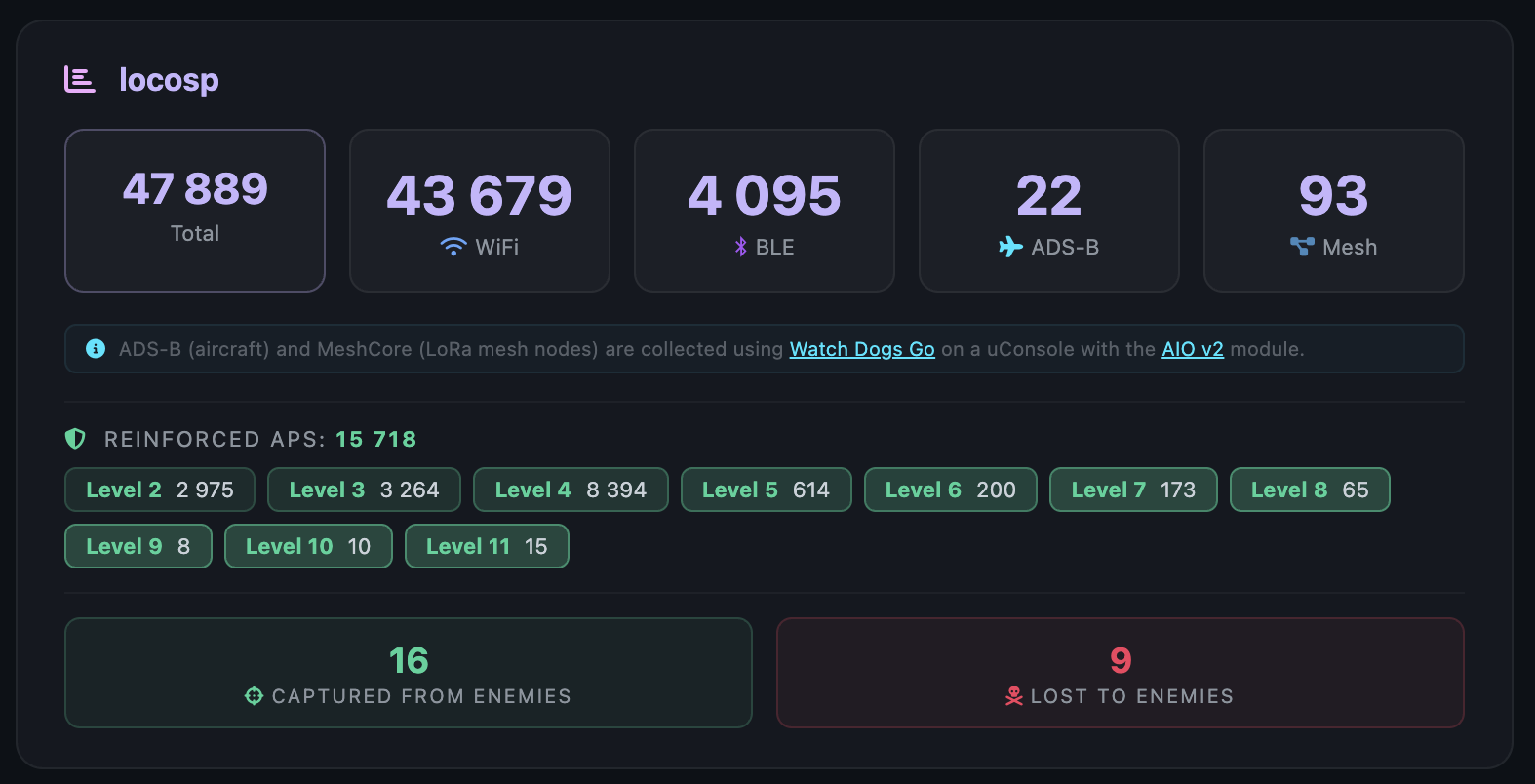
One glance at your profile and you know: what you have, what you fight with, what you're losing and who you're attacking. Full transparency over your arsenal.
Know your enemy — and your own resources 🎯
2026-04-15 · PRIVACY
🕵 Private Mode — show your map without exposing your APs
A new button in the map top bar for streamers, content creators, and anyone who wants to share their map publicly without giving away the exact location of their access points. Click once — your individual AP markers disappear and are replaced with aggregated territory cells, the same kind of cells you see for other players' areas.
End result: Your own map looks like an outside observer's view of your area — your neighbour sees that you control the neighbourhood but no longer sees any SSID, MAC, or precise router position. The territory grid is aggregated to cells of roughly 2×3 km, so showing this map on YouTube or in a screenshot is safe.
The state persists in your browser — flip it on once before recording, close the tab, come back later and it's still on. Click the button again to turn it off and your normal full-detail markers come back.
Where to find it:
- On the map, top-right corner, next to the profile / help / Discord buttons — purple icon ( when off, when on)
- Stronger purple glow means the mode is active
Off:
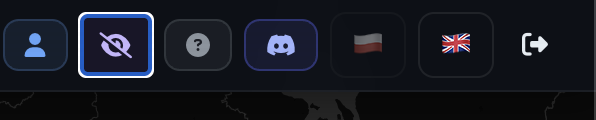
On:

It only affects your own browser — the server still knows what you uploaded, and this does not change how visible your APs are to other users (that's a separate Network Visibility switch in your profile). Private Mode is strictly a presentation tool for you.
Stay safe on stream 📹
2026-04-15 · DISCORD
🔗 Link your account to Discord — bot commands work regardless of handle
If your Discord handle is different from your username here (most people's is), the bot couldn't find you when you ran /mylimit or /me. Added a simple account linking flow:
- On the WDGWars Discord server, run
/link in any channel — the command takes no arguments so it is safe even in public channels
- The bot replies privately with a 6-digit code (only you can see it)
- You paste that code in the Connect Discord card on your profile page and submit
Once linked, all bot commands — /mylimit, /me, /stats, /leaderboard, /help — work immediately, regardless of your Discord handle. New: /mylimit shows how much of your 24 h new-AP quota is still free, with a progress bar and a status chip ("plenty left / getting close / limit reached").
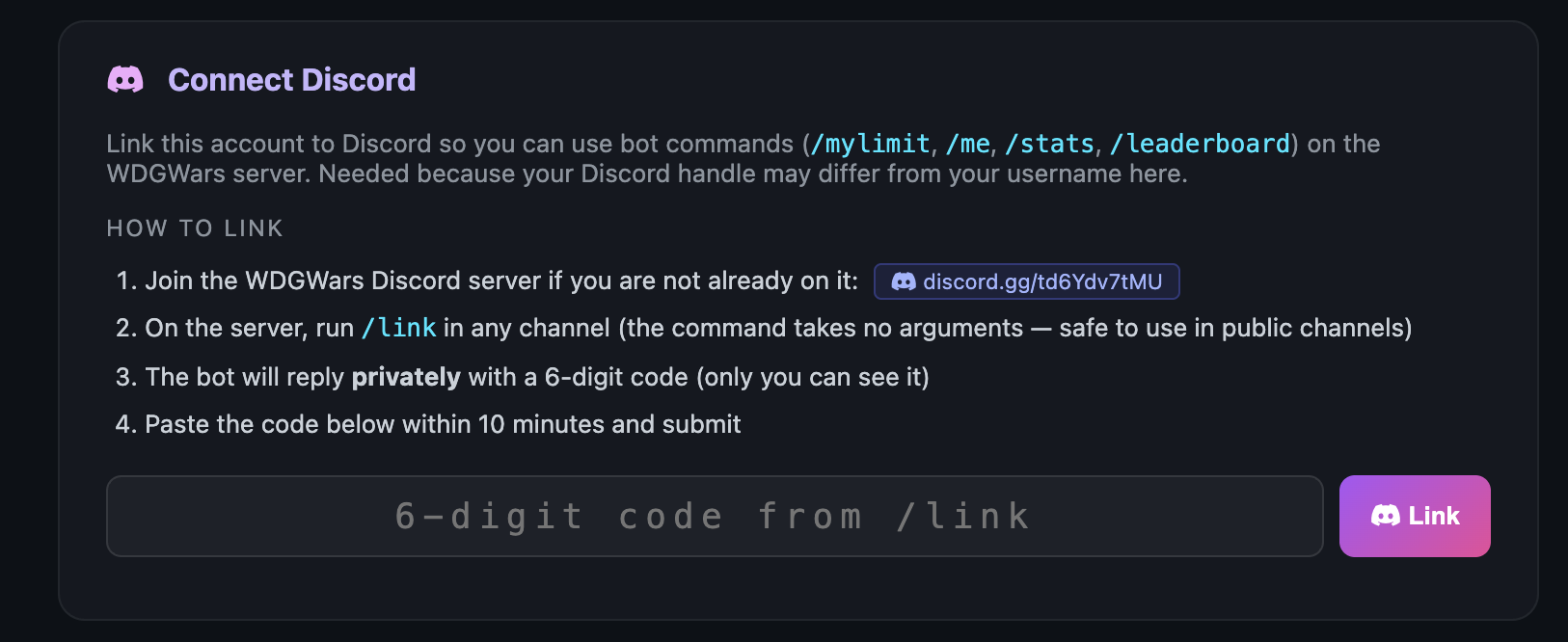
Before trying — log out, log back in, then Ctrl+Shift+R on the profile page to grab the fresh version 🙏
2026-04-15 · UPLOAD UI
📊 Daily new-AP limit visible in profile — no more guessing
Above the CSV upload form on your profile there is now a small bar showing your daily budget: how many new APs you have left, how many you have already used in the last 24 hours, your total cap and your percent usage. Colours: green when you have headroom, amber from 80 %, red at the cap.
Same numbers that /mylimit returns on Discord — zero drift between the dashboard and the bot.
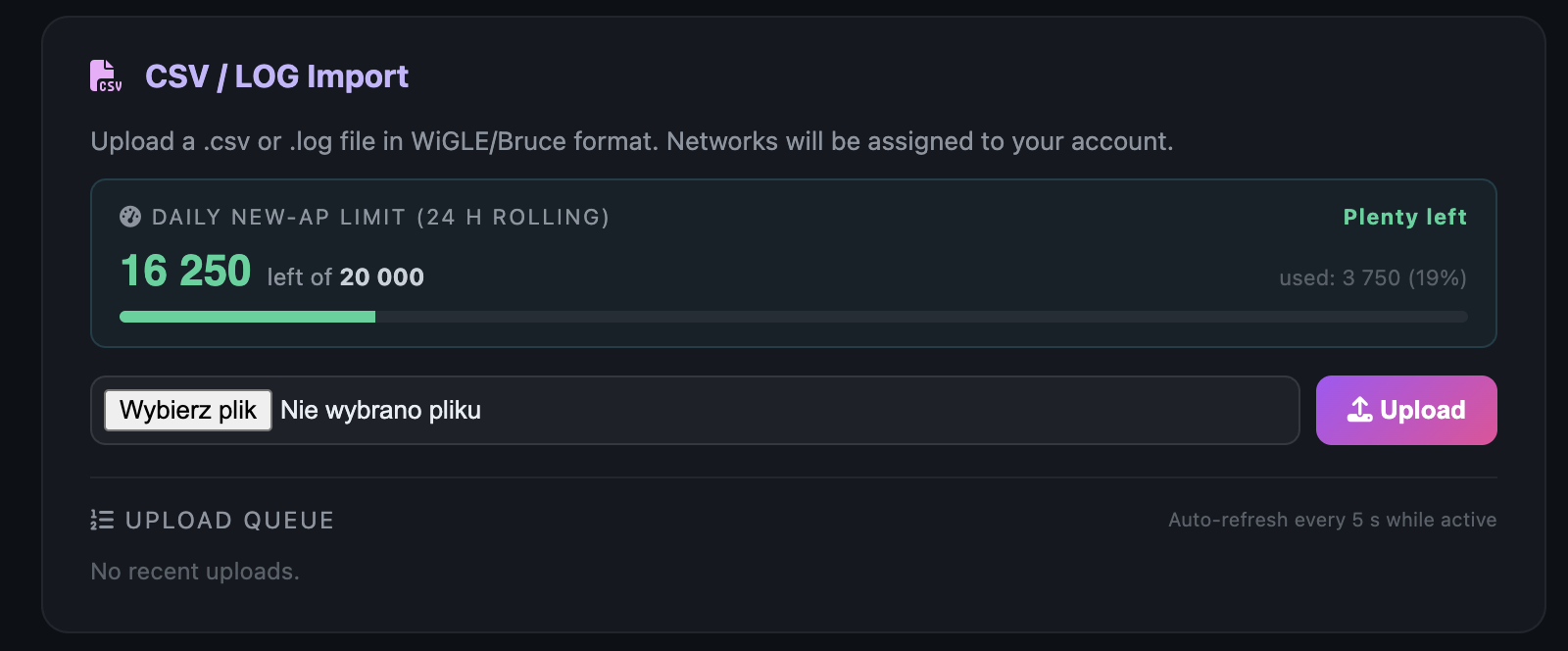
When you hit 100 % — new APs are silently skipped, but your own earlier scans still upload fine. They reinforce your existing points (and help capture enemy turf) without counting against the cap. Note: importing from external databases (WiGLE, etc.) is not allowed.
One glance and you know whether it's worth going out for another scan run 📡
2026-04-14 · UPLOAD
🚀 Big uploads no longer freeze the page
Until now, trying to upload a sizeable CSV through the profile form could leave you staring at a spinner for several minutes — and in the worst case, an empty error page. I've rewritten the upload path so that can't happen anymore:
- Your upload is accepted instantly — the file lands on the server, you get an immediate confirmation and a job number
- Parsing happens in the background — feel free to close the tab, come back tomorrow, log out — the job will still run
- "Upload Queue" section on your profile — live status (⏳ queued → ⚙️ processing → ✅ done) with the full result: APs imported, captured, reinforced
- No more races — if you accidentally click upload twice or send a second file before the first finishes, both will be processed fairly in order instead of fighting each other and losing most of their data
Integrations (Bruce, Biscuit, your own scripts) keep using /api/upload-csv exactly as before — synchronous, with full stats in the response. The profile form change is live for everyone.
⚠️ Before your first upload after this change:
- Log out and log back in — your existing session cookie may not know about the new queue section
- Hard-refresh the profile page —
Ctrl+Shift+R (or Cmd+Shift+R on Mac) to make sure the browser pulls the fresh version of the page
- If the Upload Queue section doesn't show up under the form — that's a sign your browser is holding an old cached copy, repeat step 2
Thanks for the reports 🙏
2026-04-14 · LIMITS
📦 Bigger upload limits for real wardrivers
After feedback from active wardrivers, two limits that were pinching real-world use got bumped:
- Daily cap:
6,000 → 20,000 new APs per user per 24h. The old number was tuned for casual phone-based wardriving, but sessions with dedicated scanners regularly pull 8-15k APs in one go and the cap was forcing people into a multi-day backlog for no good reason.
- Max file size:
15 MB → 35 MB for /api/upload-csv. Leaves headroom for long sessions that bundle WiFi + BLE + cell in a single file without manual splitting.
20k/24h still isn't "unlimited" — scripted flood attempts still trip the limit. If you're active and it still pinches you, reach out and we'll bump you individually.
Thanks for the report 🙏
2026-04-12 · HOTFIX
🐛 Profile upload broken for teamless users
A PHP type error (silently failing — not logged anywhere) caused users who weren't in any team to hit a blank 500 error when trying to upload CSV/LOG files through the profile page form. The API endpoint (/api/upload-csv) worked fine throughout — this only affected the web form on the profile page.
It's fixed now. If you tried to upload a file and saw an empty "This page isn't working" error page — sorry about that. Refresh your profile and give it another shot, everything should work as expected.
Thanks r4tkn for the report 🙏
2026-04-12 · PLATFORM UPDATE
🛡️ Anti-cheat improvements
- Strengthened upload validation to better detect fake/forged wardriving data
- Fixed a bug where legitimate privacy-randomized MACs from modern phones were being rejected (thanks Hedge for flagging this!)
🗺️ Privacy-first map
- Other users' access points are now shown as aggregated territory instead of individual markers — no more exact street-level locations of networks you don't own
- Your own APs still show in full detail on your map
- Team territories computed from the same aggregated data — no overlaps, whoever captures last owns the cell
✨ New features
- ⚔ Capture memorials — see which territory was captured from whom in the last 24h directly on the map
- 🎥 Community videos — #wdgwars videos auto-featured on the map and in the Press section
- 👥 Join teams from your profile page with invite codes (previously only during registration)
- 📊
/api/me endpoint for third-party integrations (Biscuit support incoming)
⚔️ Territory war mechanics clarified
- Only WiFi participates in captures (BLE/BT use randomized MACs, not suitable for territory warfare)
- All loot types (WiFi/BLE/BT/ADS-B/MeshCore) count toward your team's visible territory
🔒 Account safety
- New accounts are private by default (your APs hidden from others until you opt in)
- Profile page lets you toggle visibility anytime
- Registration flow fixed — recovery seed now shown reliably
🐛 Bug fixes
- Badges now awarded correctly after every activity (upload, team actions)
- New player / team alerts notifications fixed
- Several routing 404s eliminated
Stay safe, happy wardriving 📡 — WDGoWars team